
The undocumented 249-file limit for Googlebot rendering
Google's rendering loads at most 249 files per page. File 250 and everything after it is never requested. When that is a script your page needs, Google renders an empty page and Search Console still shows a green check.
Key takeaways
- Google loads at most 249 page resources per render: stylesheets, scripts, images, fonts and API calls. The HTML itself is not counted.
- The limit is nowhere in Google's documentation. Google documents 2 MB per file, not a number of files.
- Google loads the first 249 files it discovers and drops the rest. On a modern page that is often the JavaScript at the back of the queue.
- Search Console stays green: "URL is available to Google" while the app crashed in Google's own screenshot.
- The fix is order and count: code first with modulepreload, fewer distinct URLs, batched API calls, content in the HTML.
Google’s rendering loads at most 249 files per page. File 250 and everything after it is never even requested. And this has some critical technical SEO consequences.
This number is nowhere in Google’s documentation. I went through the JavaScript SEO docs, the Googlebot docs, the crawl budget guide and the URL Inspection help. Google documents a 2 MB limit per file. How many files? Not a word.
And the impact is huge. It decides whether Google sees your page complete and stable, how you have to prioritize the assets in your HTML, and how many files a page can load at all. When a script your page needs sits past the cutoff, Google renders an empty page, and Search Console still shows you a green check.
In November 2026 I tested it, on a test page I built for exactly this, in Search Console and in the Rich Results Test. Everything below is Google’s own screen. Click here and Google’s Rich Results Test starts on that page: you watch it crash yourself.
249 what? Files / Requests / Resources
A web page is not one file. The HTML pulls in stylesheets, scripts, images, icons and fonts, and your JavaScript app fetches data while it runs. Each of those files is a separate request, a “page resource” in Google’s terms. The HTML itself sits outside that count.
Google loads 249 of those resources. Then it stops.
At 156 files, the whole catalog renders
The app loads a stylesheet, the app script, product images and four more JavaScript files. Those are lazy chunks, the way modern builds split up their code. I ran it with 150 images. In Search Console I opened URL Inspection and clicked Test live URL.

Green check on the left. On the right, under View tested page, I opened More info. Page resources says “All resources were loaded”. And in Google’s screenshot?

Green banner, 20 products. I put the status right on the page so you can see at a glance whether the app ran.
At 250 files the app crashes and the check stays green
Same page, same code. I upped the image count from 150 to 244. Add the stylesheet, the app script and the four JavaScript chunks: 250 files, one over the limit.

Still a green check. Still “Page can be indexed”. Look at Page resources on the right.

“1/250 couldn’t be loaded”. Which file? Click Page resources.

The app’s last JavaScript file, marked “Other error”. My server log shows the HTML plus 249 files per render, and then nothing. Google never even asked for that last script.

APP CRASHED: 0 products. One file over the limit and Google gets an empty product grid. Open the same page in your browser and everything works. The HTML returns 200, every file is tiny and returns 200 when you test it, the JavaScript console panel says “No messages”, and the verdict is green. (I love bugs like this. Well… once I find them.)
The cutoff is exactly 249 files, every time
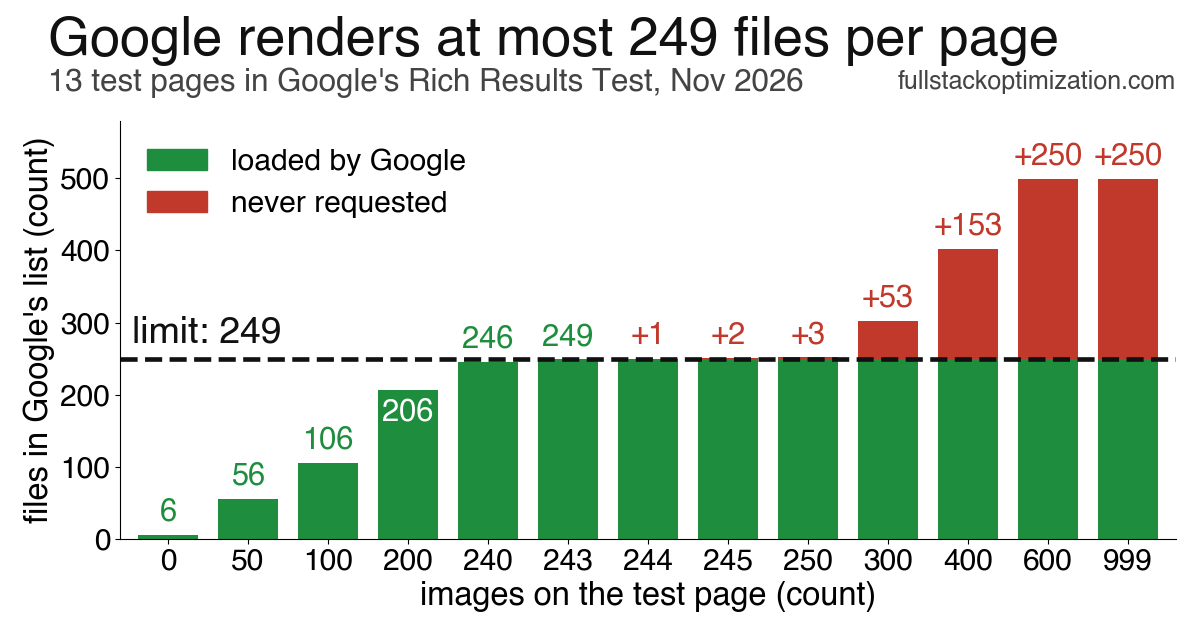
I tested 13 page sizes, from no images up to 999 images.

Everything loads up to the limit. At 243 images you have 249 files and “All resources were loaded”. At 244 images you have 250 files and “1/250 couldn’t be loaded”. From there on Google loads exactly 249 files every time. My server log agrees on every run. (Why “249 + 3” at 250 images and not more? There the images sit in the HTML before the app script, so the app script itself is file 252 and gets cut. Its four JavaScript chunks are never even discovered, so Google lists 252 files, not 256.)
Google’s resource list has a limit of its own. It stops at 499 entries, so at 600 and at 999 images you see “250/499 couldn’t be loaded”.
Before the sweep, I ran a pre-registered study in the Rich Results Test with 18 runs in random order across three different networks. In 12 of 12 runs above the limit, Google loaded exactly 249. In 6 of 6 below it, everything loaded.
Google drops the files it discovers last
First come, first served. Google loads the first 249 files it discovers and drops the rest. I numbered the images on my test page. The ones Google dropped always had the highest numbers.
A few thumbnails at the bottom of the page, who cares… On a modern page it’s very often your JavaScript at the back of the queue. Your app starts, puts products and images on the page, and only then asks for the rest of its code. By then Google has used up its 249.
API calls count towards the limit
I tested every kind of file I could think of, 300 of each.
- Scripts and stylesheets count exactly like images.
- API calls count. I set up the app to make 300 data requests (fetch, XHR) before loading the rest of its code. 247 calls went through, then Google stopped. The code never arrived and the app crashed.

Search Console lists the four JavaScript files as Script and the data requests from number 247 on as XHR. Every entry is marked “Other error”. And Google’s screenshot: APP CRASHED: 0 products.

- Lazy images still count. With loading=“lazy”, Google’s renderer still requested 243 of the 300 images. The app survived because the scripts loaded first. Lazy loading moves the image requests later in line. They still count.
- The same URL counts once. I gave all 300 image tags the same image URL. Search Console said “All resources were loaded”. 8 requests in total: the HTML plus 7 distinct files.
Google counts distinct URLs. However many tags point at the same URL, it is one file.
The app renders when Google loads the code first
I took the same 300-image page and added one modulepreload line in the head for each JavaScript file. Now Google discovers the code before the images.

Still “57/306 couldn’t be loaded”. 306 minus 57 is 249, again. Open the list.

Every entry is an image now. And in Google’s screenshot the products are back.

APP RENDERED: 20 products. Same number of files. Different order.
Page resources shows you if you’ve hit the limit
You can check your own page in two minutes. In Search Console, go to URL Inspection and click Test live URL. Open View tested page, then More info, then Page resources. Say it reads “X/Y couldn’t be loaded”. If Y minus X is exactly 249 and the failures are marked “Other error”, you’ve hit the limit. (A 404 or a file blocked by robots.txt also counts as “couldn’t be loaded”, so check the labels.) Open the list and look for Script and XHR entries. That’s code and data Google never got.
- Code first. Use modulepreload or early script tags so Google discovers the app script and its chunks before any image.
- Fewer distinct URLs. Reuse the same URL for repeated images, sprite or inline your icons, and bundle small files.
- Batch API calls. Batch the per-product API calls into one request for the list.
- Content in the HTML. Put the content in the HTML. In the tests where the app script itself was cut (300 images placed in the HTML before it), the app never ran, but the page was still complete because the products were already in the server HTML.
In every Search Console live test I ran, my server log showed Google rendering the page twice, once in smartphone mode and once in desktop mode. Both stopped at 249.
I wrote a scientific paper with the pre-registered study, the 13 page sizes, every file type, 22 unedited screenshots with hashes, and every server log. Get the PDF below.
Sources
All read on 2026-11-23.
- Google Search Central Blog, Gary Illyes: Inside Googlebot: demystifying crawling, fetching, and the bytes we process, 31 March 2026, updated 29 October 2026
- Google Search Central: Googlebot
- Google Search Central Blog: Crawling December: The how and why of Googlebot crawling, 3 December 2024
- Google Search Central: Understand the JavaScript SEO basics
- Google Search Central: Fix Search-related JavaScript problems
- Search Console Help: URL Inspection tool
- Google Search Central: Optimize your crawl budget
Frequently asked questions
How many files does Google load when it renders a page?
At most 249 page resources per render. In 12 of 12 test runs above the limit Google loaded exactly 249, in 6 of 6 below it everything loaded.
Do API calls count towards the 249-file limit?
Yes. Data requests made with fetch or XHR count like any other file. In my test 247 calls went through, then Google stopped and the app never got its code.
Do lazy-loaded images count?
Yes. With loading="lazy", Google's renderer still requested 243 of 300 images. Lazy loading moves image requests later in line, they still count.
Does the same URL used many times count more than once?
No. Google counts distinct URLs. 300 image tags with the same image URL are one file.
How do I check if my page hits the limit?
In Search Console, run URL Inspection, Test live URL, then View tested page, More info, Page resources. If it reads X/Y couldn't be loaded, Y minus X is exactly 249 and the failures are marked Other error, you have hit the limit.